One click to export up to 3000 likers on a LinkedIn post, Enrich Email with Email Finder API, save to CSV, Excel and JSON files.
Get started - it's free






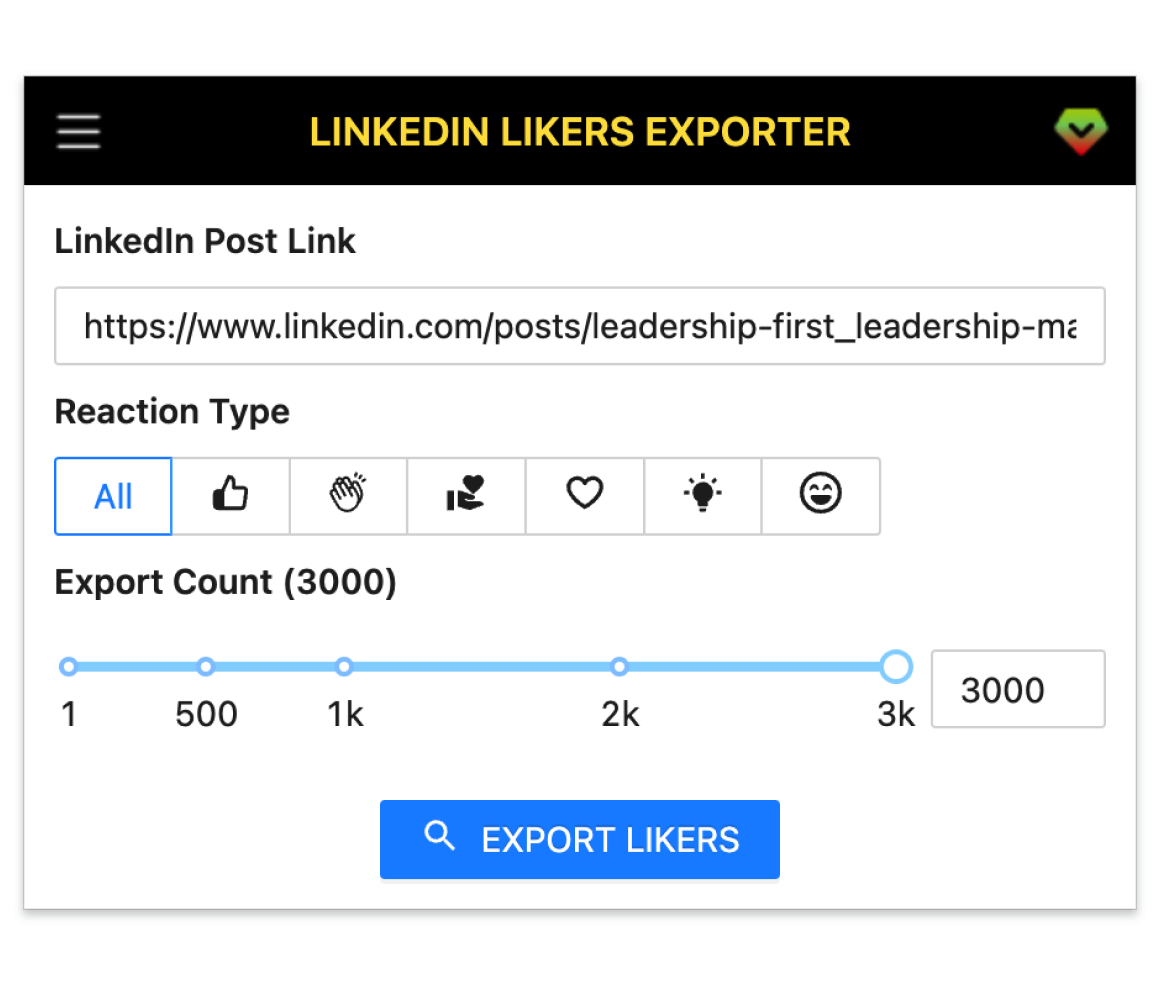
A smart tool to generate leads on LinkedIn by exporting all likers with Email on a LinkedIn post.
Collect up to 3k reactions from a single LinkedIn post.
Works on personal posts and group feeds.
Grab company, school, headline and more profile data.
Find emails via Apollo, Hunter, Snov, Datagma and more.
Target likes, celebrates, supports, loves, insights and curious.
Save results in CSV, XLSX and JSON formats.
Get started in a few simple steps.
Add LinkedIn Likers Exporter to your browser.
Open the extension, paste a post link and click Export.
Save results as CSV, Excel or JSON.
How teams use LinkedIn Likers Exporter in their daily workflow.
Find buyers who reacted to competitor posts, enrich emails, export and outreach.
Identify engaged candidates from industry posts and export profiles for follow‑up.
See who engages with your content, segment by reaction, grow your list fast.
Capture engaged members from group feeds and import to your CRM or ESP.
Export stakeholders reacting to partner news to start timely conversations.
Batch collect likers across posts, filter by reaction, deliver CSV/XLSX lists.
Fields included in exported datasets.
| Field | Description | Example |
|---|---|---|
| Public Identifier | LinkedIn profile public identifier. | john-doe-123456 |
| Profile Link | Direct link to the profile. | https://www.linkedin.com/in/john-doe-123456/ |
| First Name | Given name from profile. | John |
| Last Name | Family name from profile. | Doe |
| Full Name | Combined first and last name. | John Doe |
| Subtitle | Headline below the name. | Senior Product Manager at Acme |
| Picture URL | Profile photo URL if public. | https://media.licdn.com/dms/image/... |
| Reaction Type | Type of reaction on the post (LIKE, CELEBRATE, etc.). | LIKE |
| Degree | Connection degree relative to you (1st, 2nd, 3rd). | 2nd |
| Company Name | Current employer name. | Acme Inc. |
| Job Title | Current role title. | Senior Product Manager |
| Employment Type | Employment type for current role. | Full-time |
| Company Industry | Industry of the company. | Computer Software |
| Company Location | Company location as listed. | San Francisco Bay Area |
| Job Date Range | Dates for the current role. | Jan 2022 – Present |
| Company Employee Count | Employee size bracket of the company. | 201-500 |
| Company ID | LinkedIn internal company ID if available. | 1234567 |
| Company Universal Name | Company universal handle/slug. | acme-inc |
| Company URL | LinkedIn company page URL. | https://www.linkedin.com/company/acme-inc/ |
| School Name | Most recent education institution. | Stanford University |
| Degree Name | Degree attained or in progress. | Master's |
| Field Of Study | Major or field of study. | Computer Science |
| Education Date | Dates for the education entry. | 2016 – 2018 |
| Industry Name | Profile industry setting. | Information Technology & Services |
| Summary | About summary if available. | Product leader building B2B SaaS. |
| Skills | Top skills if visible. | Product Management; SQL; Go-to-Market |
| Certifications | Highlighted certifications. | PMP; Scrum Master |
| Projects | Notable projects if listed. | Growth Analytics Platform |
| GEO Location Name | Profile location text. | San Francisco, California, United States |
| GEO Country Name | Country derived from location. | United States |
| Prefer Country Code | Preferred country code if set. | US |
| Prefer Language Code | Preferred language code if set. | en |
| Birth Date | Birth date if public (month/day may be partial). | 1990-05-10 |
| Is Creator | Whether the profile has Creator Mode enabled. | true |
| Is Influencer | Whether LinkedIn flags the user as an influencer. | false |
| Is Premium | Whether the user has LinkedIn Premium. | true |
Where you can get answers to common questions about LinkedIn Likers Exporter
You don’t have to take our word for it
Pulled 600+ likers from a competitor’s post over lunch. Clean CSV, dropped into Apollo, 8 replies by Friday.
Michael
Sales Assistant
Took me 5 minutes to grab an audience from three posts and enrich emails. My team kept saying: ‘Wait, that’s it?’
Jessie
Marketing Manager
I paste a link, hit Export, and get a list that actually books meetings. 12 demos last month came from one viral post.
Ava
SDR
Filtering by reaction type surfaces people who actually care. I went from 30 minutes per lead to about 5.
Liam
Recruiter
I export weekly to see who’s engaging. Found two sponsors and a podcast invite just from the liker list.
Sofia
Content Creator
Group exports used to be copy‑paste hell. Now it’s one click and I’ve got a tidy XLSX for the team.
Maya
Community Manager
We track partner news, export the likers, and start warm intros. It’s the simplest BD loop we run.
 Ethan
Founder
Ethan
Founder
Clients want lists yesterday. Batch exporting across posts saves my VA 3–4 hours per project.
 Olivia
Agency Owner
Olivia
Agency Owner
Apollo enrichment boosted our match rate. The ‘high‑intent from reactions’ audience outperformed our lookalikes.
 Lucas
Growth Marketer
Lucas
Growth Marketer
The fields map cleanly to our CRM. No weird columns, no reformatting—just import and go.
 Zoe
Sales Operations
Zoe
Sales Operations
Export up to 3,000 likers per post, enrich emails, and download clean CSV/XLSX lists in minutes.
7‑day money‑back guarantee on Pro. Cancel anytime.